A scope that follows your hand
Drag the spectrum to tune, double-click a signal to jump to it, scroll to zoom. The waterfall moves with you, so its history stays where the signals were.
Open beta · sign-ups open
ShackRat puts your radios side by side — each with its own scope and waterfall, and FT8 decoded alongside — on your desk, or in a browser across the house.
Today
In beta
Coming
Built natively for each radio's own protocol — not glued together from five programs. Every feature says where it stands: Today works on real radios, In beta is being tried, Coming is on the way.
Drag the spectrum to tune, double-click a signal to jump to it, scroll to zoom. The waterfall moves with you, so its history stays where the signals were.
FT8 decoded straight from your radio's audio, CQ calls picked out, no second program — and calling CQ, with the contact sequenced for you. Answering from the list, and FT4, WSPR, PSK31, RTTY and CW, are in the beta.
Run the ShackRat server on a small computer by the radio, then operate from the app or a web browser elsewhere on your network — scope, waterfall, decodes and sound. Encrypted and password protected.
Outside your bands, transmit is disabled and the display says so. Operating remotely, a dropped connection unkeys the radio.
A live SWR trace while you transmit, and a quick low-power check that logs what the meters read — so you see the match before you work the pile-up. Tuning with your radio's antenna tuner from the same tab is in the beta.
APRS decoded from your radio's audio — stations, positions and messages — and, on an Icom D-STAR radio, who's calling, through which repeater, with their message. Being tried; not yet on the air.
A pane for each radio, arranged your way, from a laptop to a big monitor running the whole station.
Most stations run three or four of these at once. Here's how ShackRat lines up against each — including where it doesn't yet.
| Feature | ShackRat | wfview | Icom RS-BA1 V2 | Ham Radio Deluxe | WSJT-X | flrig + fldigi |
|---|---|---|---|---|---|---|
| Radios and the screen | ||||||
| Radios | Icom IC-705, IC-7300ID-52A in beta; more coming | Icom, some Kenwood and Xiegu | Icom | 100+, most makes | Most makes, via Hamlib | Most makes |
| The radio's own spectrum scope and waterfall | Today | Yes | YesIC-7300, IC-705 and others | Some radios | The audio passband only | — |
| Several radios on one screen | Today | — | — | — | — | — |
| Receive-only SDRs alongside | Coming | — | — | — | — | — |
| Digital modes | ||||||
| FT8 decoding, built in | Today | Runs beside WSJT-X | — | Logs WSJT-X's contacts | Yes | — |
| Calling CQ on FT8 | Today | — | — | Through WSJT-X | Yes | — |
| Answering FT8 calls | In beta | — | — | Through WSJT-X | Yes | — |
| PSK31, RTTY, CW | In beta | — | — | YesDigital Master | — | Yesfldigi |
| Operating remotely | ||||||
| Control over the network | Today | Yes | Yes | Yes | — | flrig, control only |
| Sound over the network | Today | Yes | Yes | Needs another program | — | — |
| From a web browser, nothing to install | Today | — | — | — | — | — |
| Transmitting | ||||||
| Transmit and PTT | Today | Yes | Yes | Yes | Yes | Yes |
| Transmit greyed out outside your bands | Today | — | — | — | — | — |
| Unkeys if the remote connection drops | Today | — | — | — | — | — |
| SWR graph and tuner, one tap | TodayThe tuner in beta | — | — | — | SWR in the status bar | — |
| Where it runs | ||||||
| Windows | Today | Yes | Yes | Yes | Yes | Yes |
| macOS | ComingThe browser meanwhile | Yes | — | — | Yes | Yes |
| Linux | TodayThe server; the app builds and starts | Yes | — | — | Yes | Yes |
| Phones and tablets | In betaAndroid; any phone's browser today | — | — | — | — | — |
| And | ||||||
| Logbook | Coming | — | — | Yes | A basic log | fldigi's log |
| Price | Free in the beta | Free, open source | About $160 | $99$49.95 a year for updates, optional | Free, open source | Free, open source |
Other programs as their own websites and documentation describe them, in October 2026. “—” means we didn't find it, not that it can't be done another way. Got something wrong? Tell us at hello@shackrat.com and we'll fix it. Names are their owners' trademarks.
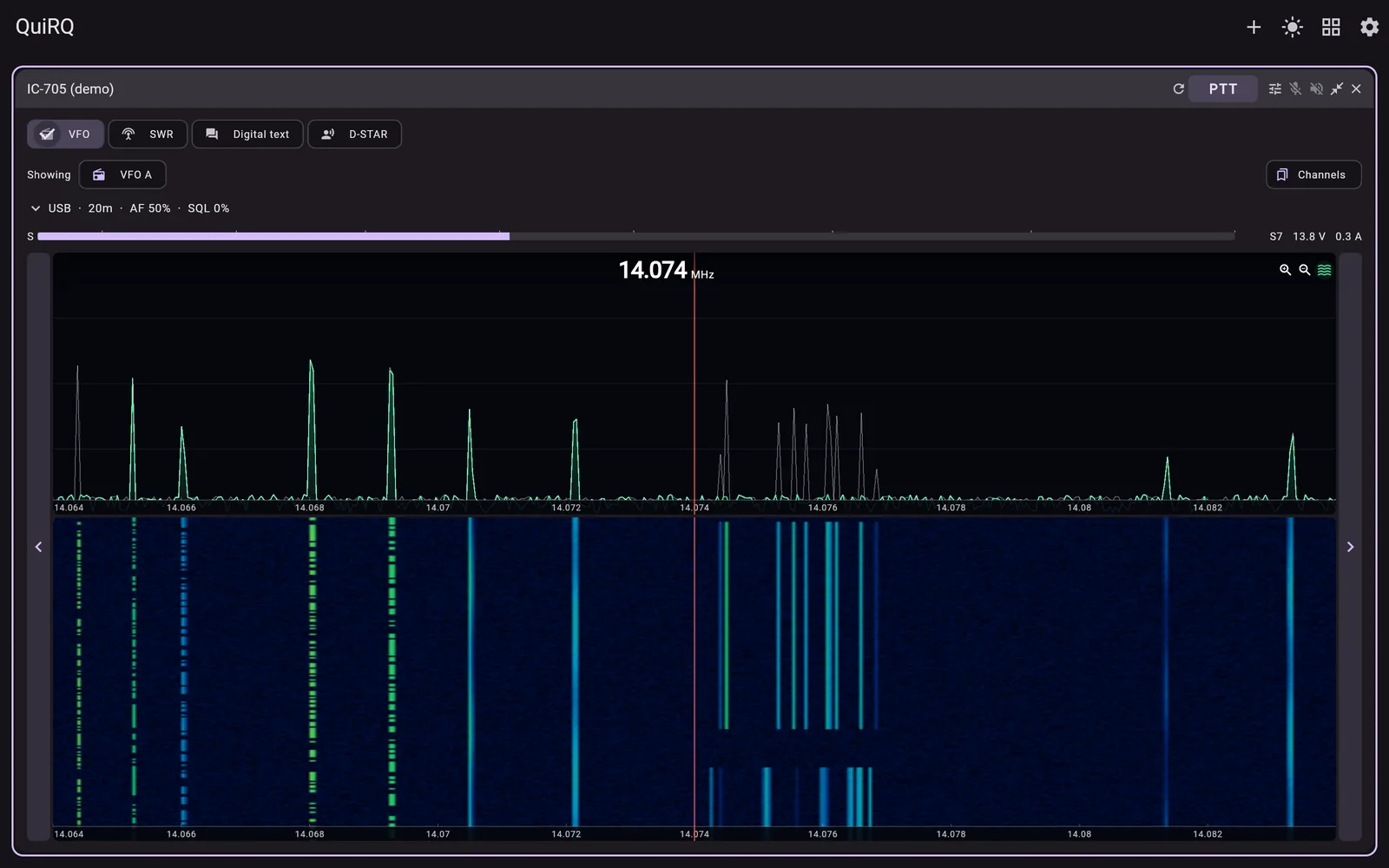
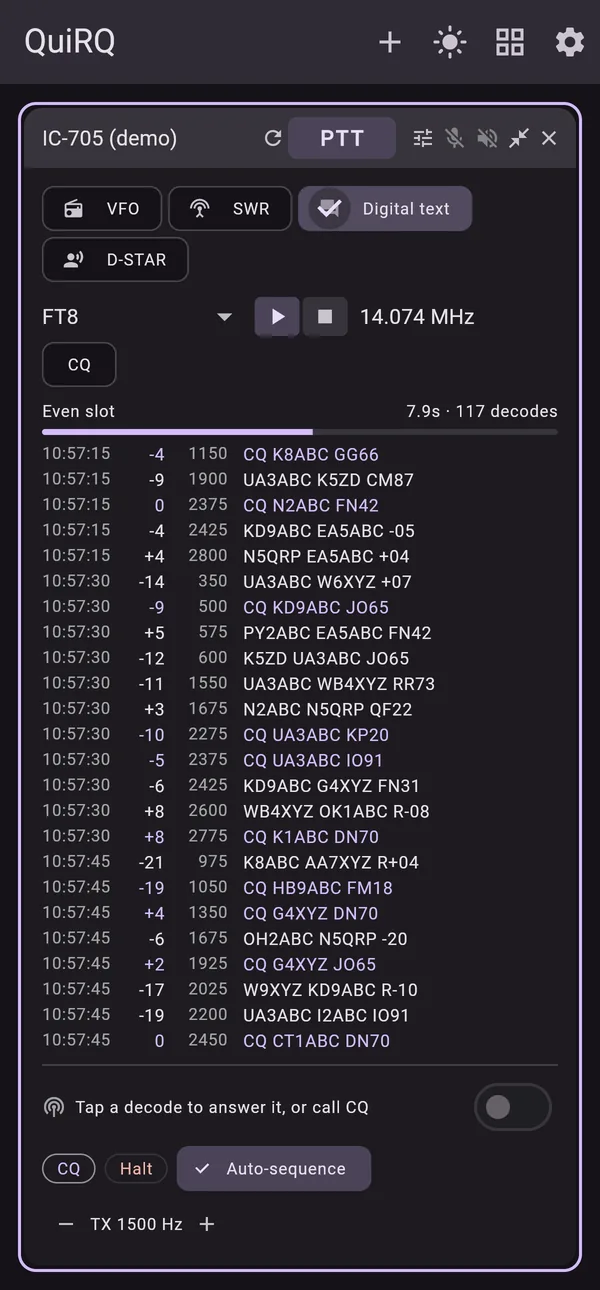
Screenshots from ShackRat's built-in demo station, whose signals and callsigns are simulated; screenshots from real radios are on the way.
ShackRat is designed from the ground up to run on all the major platforms, and to have the same features regardless of the platform it runs on. It also maintains a strong and flexible model for connections, protocols and radio capabilities, so that it can easily be extended to new radios and new platforms as they come along. What's described below is what we've actually tested and verified; what we think will work without any additional code is a much longer list.
Be among the first on the air with ShackRat. Tell us a little about your station and we'll send you the download, and news as new radios arrive.
Today: the Icom IC-705 and IC-7300, each driven over its own protocol, written from Icom's documentation and tried on the real radio. The ID-52A is being tried now, and the ID-52A PLUS and QRP Labs QMX+ are coming next. Tell us yours when you sign up — it helps decide what follows.
No. ShackRat drives a radio plugged straight into the computer it runs on. The server is for when you want the radio somewhere else — the shack, the attic, a field site — and to operate it from the app or a browser.
ShackRat disables transmit outside your amateur bands and says so on the display, and while you transmit, the app keeps checking in with the server — if it goes quiet, from a dropped connection or a closed laptop, the radio is unkeyed. You remain the control operator, so follow your licence's rules for remote operation.
We'll say before the beta opens. Signing up commits you to nothing.
We use them to send you the beta and ShackRat news, and nothing else. We don't sell or share them. Ask, and we'll delete them. More in the privacy note.